
Play PES 6 Online in Your Browser
Play PES 6
Arrow keys Move / navigate menusX (PSP Cross) Confirm / short passD (PSP Circle) Back / long pass
How to play PES 6 in your browser
Click Play Game above, then click inside the game to give it keyboard focus. Use Fullscreen for more room.
- Press Play Game and choose Jugar sin relatos (Más ligero). Wait for game data, then select English and a difficulty. Use X to confirm and the arrow keys to navigate.
- Choose Match, then P1 quick start; select each team, confirm the strip selection and choose Match Start.
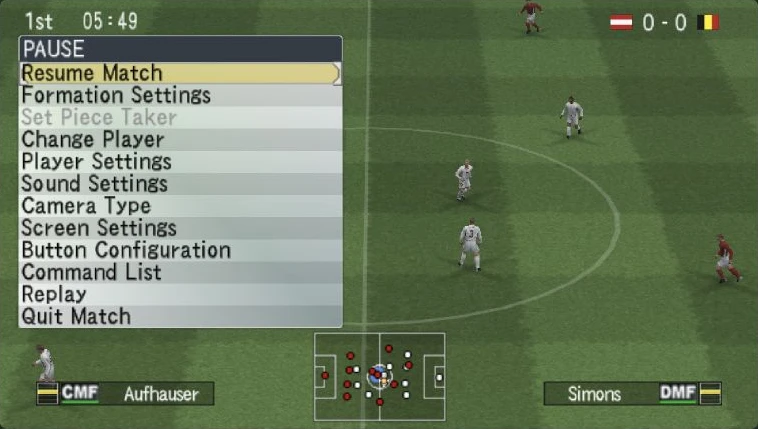
- At kickoff press X to pass and use the arrow keys to move the selected player. Space opens Pause. Controles below the game shows the browser-to-PSP mappings.
PES 6 keyboard controls
- Move / navigate menus
- Arrow keys
- Confirm / short pass
- X (PSP Cross)
- Back / long pass
- D (PSP Circle)
- Shoot
- A (PSP Square)
- Through ball
- W (PSP Triangle)
- L1 / R1
- Q / E
- Pause / Start
- Space
PES 6 not loading or controls not responding?
- Use the real game-start buttons; advertisement links such as Confirm Account or Continue Here are not required to start the offline match.
- Data streams on demand, so a loading notice may interrupt startup or play. The full-data download setting is optional and increases the initial transfer.
- Click the game canvas before using keyboard controls. Browser keys are mapped to PSP buttons; X is confirm/pass, and A is mapped to Square/shoot.
- The tested match covered kickoff passing, movement and pause only. Shot/goal outcomes, a completed match, online mode, commentary, saves and mobile play remain unverified.
If the embedded game stays blank, reload the player or try the source page in a new tab.
Open game sourceBrowser version, game files and saves
- Version
- Pro Evolution Soccer 6 (PSP) through OptiProjects
- Access
- Start the embedded player with Jugar sin relatos (Más ligero) for the no-commentary option tested here. This is an independently maintained PSP browser version. Online play and other commentary options were not tested.
- Resources
- The source streams game data while playing and offers a full-data option described as about 300 MB. Loading notices appeared during startup and the match; engine files load in addition. Arcadle embeds the source and does not host its game data.
- Account
- No account, payment or personal game-file upload was requested for the tested offline match. Source-page advertisements are separate from game controls.
- Storage and saves
- The source says settings are stored in this browser. Match saves, export/import and online accounts were not tested. Embedded storage may be partitioned and should not be assumed to transfer between local preview, production and source tabs.
Game source and WebAssembly runtime

Runtime: PSP game / PES6Recomp WebAssembly build · View client code
- Konami Original Pro Evolution Soccer 6 creator
- OptiProjects Independent PSP browser project; not affiliated with Konami
Browser, mobile and controller compatibility
Last checked . Compatibility notes apply to this browser version.
- Desktop ChromeTested
AI-operated local iframe review on macOS Chrome: English startup, team/strip selection, Austria versus Belgium offline match, kickoff pass, player movement and pause. Loading interruptions and variable displayed frame rates were observed. Full match, online, saves, commentary, audio output and production-origin play were not tested.
- Phones and tabletsNot verified
Not tested. Source provides on-screen control settings, which do not establish verified mobile play.
PES 6 browser game FAQ
How do I start an offline PES 6 match in the browser?
Click Play Game, then choose Jugar sin relatos (Más ligero). Select English and a difficulty, choose Match and P1 quick start, select the teams and strips, then choose Match Start. X confirms menu choices.
Which browser keys match the PSP buttons?
Arrow keys move the player. X maps to Cross for confirm/short pass; D to Circle for long pass; A to Square for shoot; W to Triangle for through ball. Q/E map to L1/R1 and Space to Start/Pause. The controls panel on the source lists these mappings.
Why does PES 6 stop to load during a match?
The source streams game data on demand, so loading notices can appear during startup or play. A full-data option is available and is described by the source as about 300 MB; it increases the initial download and is not required for the checked startup route.
Do I need to confirm an account to play PES 6?
No account or payment was requested for the checked offline match. Use the actual game-start controls. Advertisement links labelled Confirm Account or Continue Here are separate from the match setup.