
Play Return to Castle Wolfenstein Online in Your Browser
Play Return to Castle Wolfenstein
W / A / S / D MoveArrow keys or drag Look in embedded playerCtrl or mouse click Fire in embedded player
How to play Return to Castle Wolfenstein in your browser
Click Play Game above, then click inside the game to give it keyboard focus. Use Fullscreen for more room.
- Press Play Game, enter a nickname and press Play in the source. Wait for the first resource download and server connection.
- If the Allies button does not respond, press Esc to close limbo, then backtick to open the game console. Type /team blue with the leading slash and press Enter. Backtick closes the console.
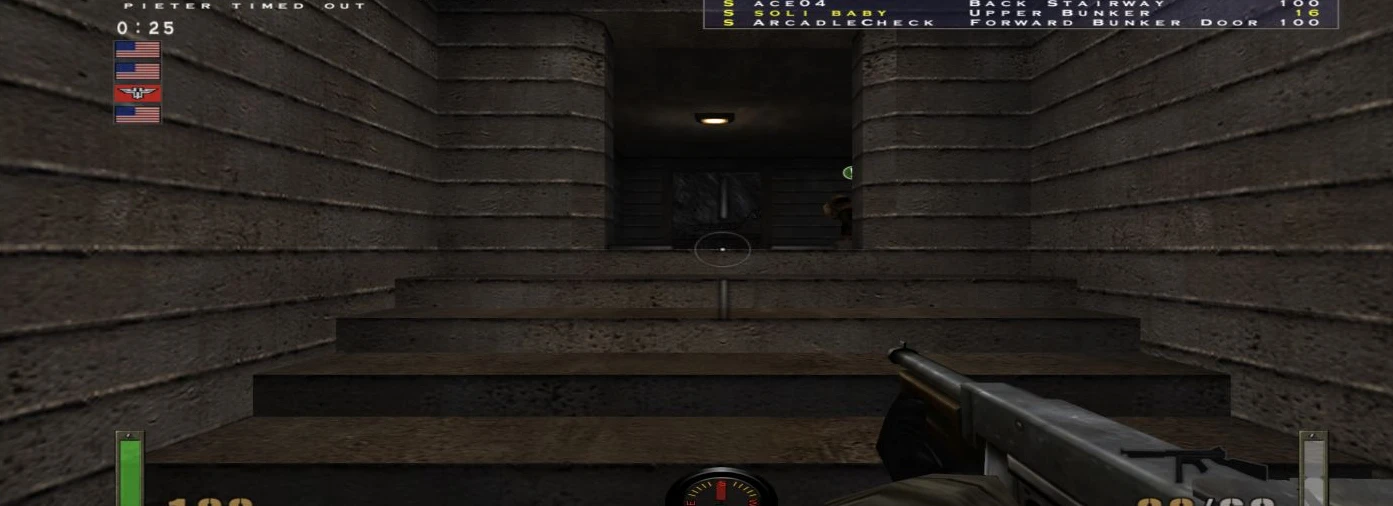
- Wait through Deploying/Following until your own health and weapon HUD appear. Use W/A/S/D to move and Ctrl or a click to fire. Server map and deployment delay vary.
Return to Castle Wolfenstein keyboard and mouse controls
- Move
- W / A / S / D
- Look in embedded player
- Arrow keys or drag
- Fire in embedded player
- Ctrl or mouse click
- Open / close console
- Backtick (`)
- Join Allies via console
- /team blue, then Enter
- Close limbo panel
- Esc
- Open limbo panel
- L or M (shown by game)
Return to Castle Wolfenstein not loading or controls not responding?
- The leading slash in /team blue matters: the engine treats unprefixed text as chat during active play. Enter only the documented command when using the console.
- Spectator and Following views are not your own spawned player. Wait for the deployment countdown to finish before trying movement and fire.
- The test observed delayed or snapping movement and unchanged displayed ammo during shots. Own movement/location and muzzle feedback worked, but ammo consumption, hit damage and match objectives were not verified.
- This entry covers multiplayer, not the single-player campaign. The separate Wwasm demo/retail-file flow was not played. Mobile, audio output and production-origin play remain unverified.
If the embedded game stays blank, reload the player or try the source page in a new tab.
Open game sourceBrowser version, game files and saves
- Version
- RTCW multiplayer through iortcw / Wwasm
- Access
- Enter a nickname and press Play in the embedded source. This is an unofficial multiplayer preservation client. If mouse team selection fails, the game console command /team blue was tested to join Allies; wait for deployment before expecting your own character.
- Resources
- Source describes about 380 MB on first load; earlier local loading showed 374.9 MB. Source reports browser caching, but repeat-cache performance was not measured. Arcadle embeds the source and hosts no game resources.
- Account
- A player nickname was requested; no account or payment was requested in the tested multiplayer session.
- Storage and saves
- The source reports cached game data. Embedded browser storage may be partitioned; do not assume nickname/cache transfer between source tabs, local preview and production.
Game source and WebAssembly runtime
Runtime: iortcw multiplayer engine / WebAssembly · View engine project
- id Software / Gray Matter Studios Original game and multiplayer creators
- iortcw Maintained RTCW engine
- GMH-Code / Wwasm WebAssembly engine port
- Pieter Independent multiplayer browser host
Browser, mobile and controller compatibility
Last checked . Compatibility notes apply to this browser version.
- Desktop ChromeTested
AI-operated macOS Chrome local iframe: console team join, own deployment on MP_BEACH, movement with server location feedback, muzzle flashes and ejected cases. Mouse team buttons unreliable; movement sometimes delayed/snapped; ammo remained 30/60. Damage, full matches, audio output and production origin unverified.
- Phones and tabletsNot verified
Not tested. Console-key workaround is intended for a desktop keyboard.
Return to Castle Wolfenstein browser game FAQ
How do I join the Allies team if the mouse button does not work?
Close the limbo panel with Esc. Press backtick (`) to open the game console, type /team blue with the leading slash, then press Enter. Press backtick again to close the console and wait for deployment.
Why am I stuck in Following or spectator view?
Following and spectator views show another player, not your own spawned character. Wait through the deployment countdown until your own weapon and health HUD appear before testing WASD movement and Ctrl/click firing.
Why must the RTCW team command begin with a slash?
During active play the engine can treat unprefixed console text as chat. Use the exact command /team blue, including its leading slash. Do not enter team blue without the slash.
Is this the full Return to Castle Wolfenstein campaign?
This entry covers multiplayer through the source browser client. The single-player campaign was not checked. The source describes about 380 MB on first load; an earlier local loader showed 374.9 MB, so allow the resource transfer to finish.